Research a company: financials, analysts, profile and filings
On this page
A stock's page has four tabs for digging into a company: Financials, Analysis, Profile and Filings. Together they answer how the company makes and spends money, what professional analysts expect, who is in charge, and what it has told regulators.
These four tabs appear on stocks only. Open a stock such as Apple and select the tab.
#Financials
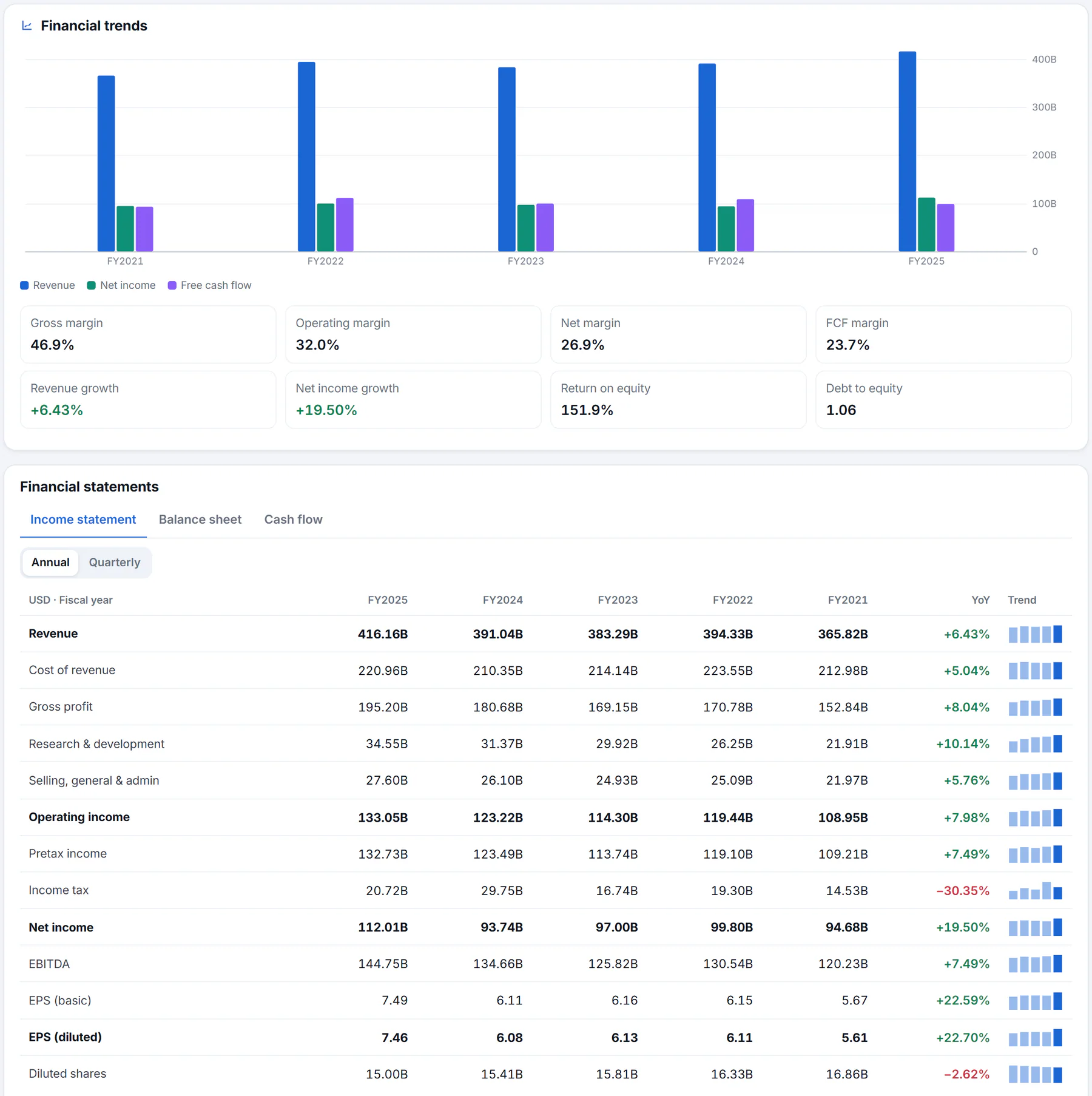
The Financials tab: a chart of the main trends, ratios, and the full statements below.
- 1Revenue, net income and free cash flow by year
- 2Margins, growth and balance-sheet ratios
- 3Switch to the balance sheet or cash flow
- 4Annual or quarterly figures
- 5Newest period first, with the change from the one before
- Financial trends: a bar chart of revenue, net income and free cash flow for each of the last fiscal years. Hover over a year for the figures and the net margin.
- Eight ratios under the chart: gross margin, operating margin, net margin and free-cash-flow margin (each a share of sales); revenue growth and net income growth against the year before; return on equity (profit as a share of the owners' stake); and debt to equity.
- Financial statements: the Income statement (what the company earned and spent), the Balance sheet (what it owns and owes) and Cash flow (money in and out). Use the Annual and Quarterly buttons to switch periods.
Each statement lists the newest period first. The YoY column (or QoQ for quarters) shows the change from the period before, and the Trend column draws a tiny bar chart of the whole run, with the newest bar highlighted. Negative numbers are shown in red.
Figures are in the company's reporting currency, shown in the top-left cell. They come from the reports the company files with the U.S. Securities and Exchange Commission. Quarterly cash flow is worked out from year-to-date filings, and a fourth quarter is the fiscal year less the first three.
#Analysis
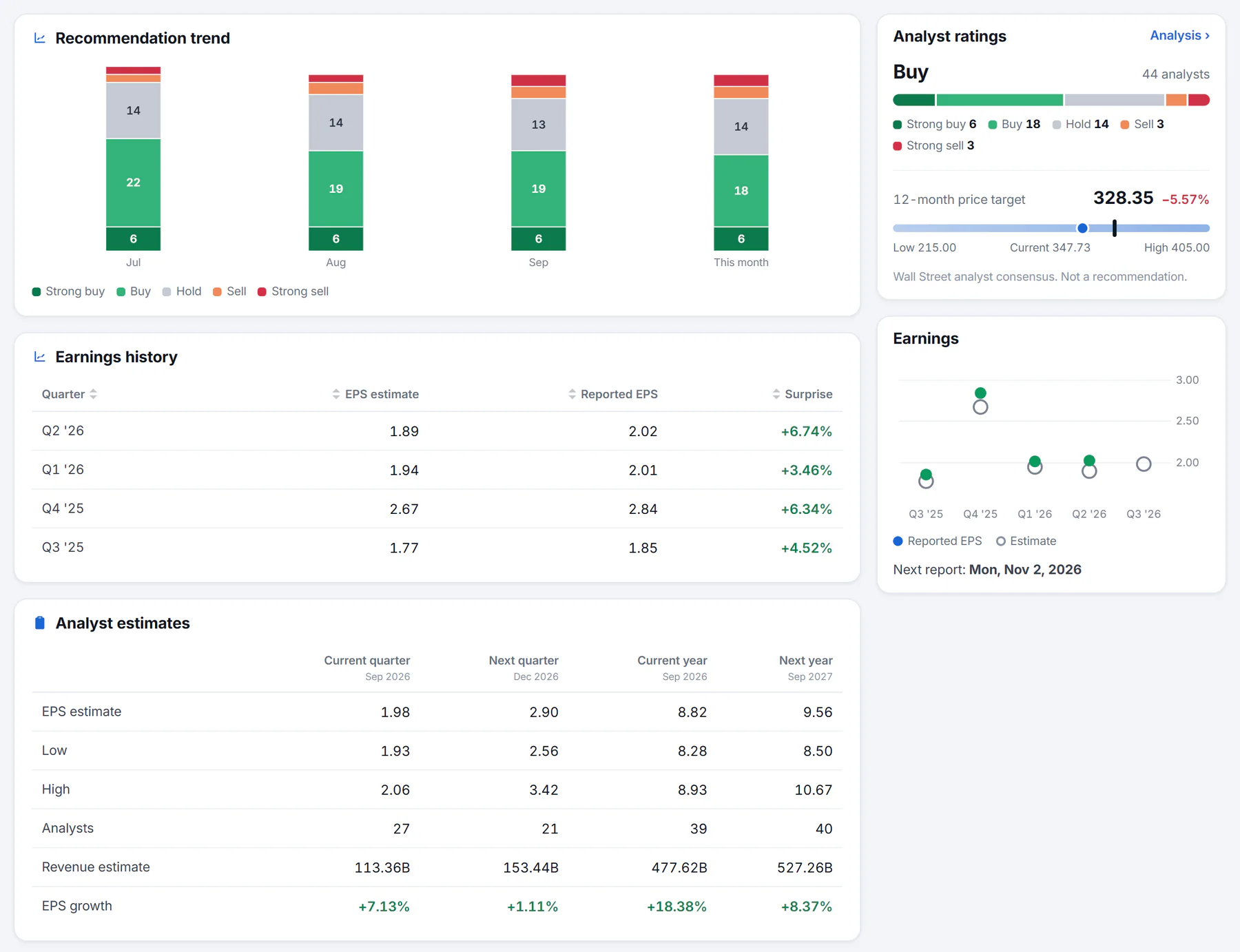
The Analysis tab: how analysts' ratings have shifted, what they expect, and how the company has done against their estimates.
- 1How the mix of ratings has changed month by month
- 2The consensus today
- 3Where analysts' targets sit against the price
- 4Estimate, reported result and the surprise
- Recommendation trend: stacked bars of how many analysts said Strong buy, Buy, Hold, Sell and Strong sell in each of the last few months. Hover over a bar for the counts.
- Analyst ratings (side column): today's consensus and the range of 12-month price targets, from the lowest to the highest, with the current price marked.
- Earnings history: for each recent quarter, the earnings per share analysts estimated, what the company reported, and the Surprise, the difference as a percentage. Green means it beat the estimate.
- Analyst estimates: what analysts expect for the current and next quarter and year: earnings per share (average, low and high), the number of analysts, expected revenue and expected earnings growth.
- Upgrades & downgrades: recent rating changes by firm, with the action (Upgrade, Downgrade, Maintains, Initiates or Reiterates), the rating and the price target.
Analyst views are opinions. They are often wrong and often move together, and the page says so: Wall Street analyst data, not a recommendation.
#Profile
The Profile tab describes the business. It has a short description, a longer business summary, a table of Key executives with their titles, reported pay and year of birth, the Company facts (sector, industry, chief executive, employees, headquarters and website), and a Registration card from the company's regulatory record: its registered name, filer status, state of incorporation, fiscal year end, business address, and any former names. Where the description comes from Wikipedia, the page credits it.
#Filings
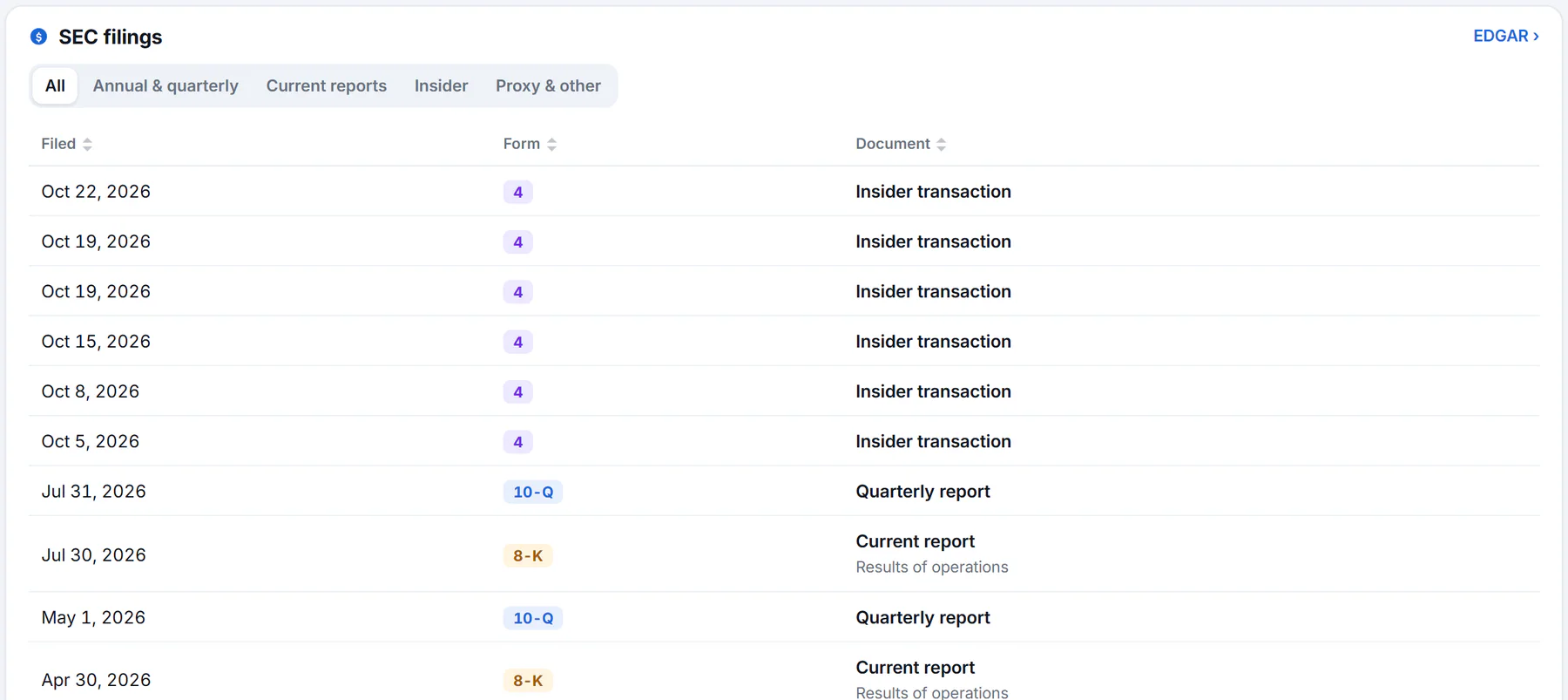
The Filings tab lists the company's reports to the SEC, newest first. Select a title to open the document.
- 1Filter by kind of filing
- 2The SEC form number
- 3Opens the filing on the SEC's site
- 4The company's full record on EDGAR
Public companies must report to the U.S. Securities and Exchange Commission, the SEC. The Filings tab lists them, newest first, with the date, the form number and a plain-language name. A short note under a current report says what it was about, for example results of operations.
Use the filter buttons to narrow the list:
- Annual & quarterly: the full yearly report (form 10-K) and the quarterly ones (10-Q), and their foreign equivalents.
- Current reports: form 8-K, which companies file to announce news such as results, deals and leadership changes.
- Insider: form 4, filed when an executive or director buys or sells the company's stock.
- Proxy & other: everything else.
Select a document's name to open it on the SEC's own site. EDGAR opens the company's full record there.
#Common questions
Why is there no Financials tab on a fund or an index?
Those tabs belong to companies. Funds have a Fund tab instead. See Funds, indexes, coins and currencies.
What does "free cash flow" mean?
The cash a company generates from running its business after it has paid for the equipment and buildings it needs to keep going.
Are the analyst ratings advice?
No. They are other people's opinions, shown for information. Nothing on Finance is investment advice.
Where do I find the date of the next earnings report?
On the Earnings card in the side column of the Overview, and on the earnings calendar.